


• -20%
  • New
dell ha65ne1-00 battery

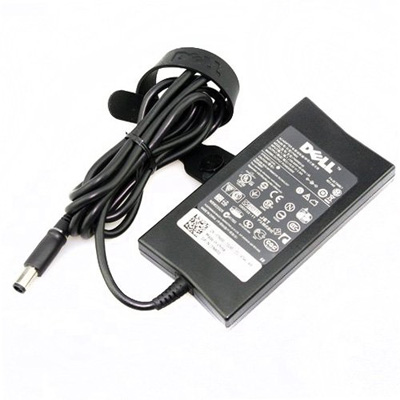
Original Dell HA65NE1-00 Laptop Power Adapter for Alienware M11x R2 Alienware M11x R3 Alienware M11x Inspiron 11 (3135) 3000 Series with Power Cord Included


On the go? This HA65NE1-00 laptop charger is exclusively designed for Dell laptop and can be used as an original laptop power adapter replacement to keep your laptop unplugged for a longer period of time. Designed for outstanding performance, this cheap original laptop power supply is the ideal companion to your Dell notebook and is perfect for you to use your computer anywhere.

The universal laptop power adapter can be used anywhere in the world with the appropriate power cord. Same quality, specifications and reliability as the original HA65NE1-00 power adapter that came with your laptop computer. Consider equipping your Dell laptop with a spare battery charger so you can take a second one for home, the office or for traveling.

Please read the following technical specifications carefully before you purchase to ensure that your current laptop charger has the same specifications as ours.
In stock

Tech Specs:

Brand:
Dell
Input Voltage:
100V-240V
Output:
19.5V 3.34A
Power Capacity:
65W
Connector Size:
7.4mm x 5.0mm
Device Type:
Power Adapter
Model:
HA65NE1-00
Power Cord:
Included

Manufacturer Parts:

  • 0P975F
  • HA65NE1-00
  • PA-2E

Compatibility:

  • Alienware M11x R2
  • Alienware M11x R3
  • Alienware M11x
  • Inspiron 11 (3135) 3000 Series
  • Inspiron 11 (3137) 3000 Series
  • Inspiron 11 (3138)
  • Inspiron 1120
  • Inspiron 11z (1110)
  • Inspiron 13R (N3010)
  • Inspiron 13z (5323)
  • Inspiron 14 (1440)
  • Inspiron 14 (1464)
  • Inspiron 14 (3421)
  • Inspiron 1420
  • Inspiron 14R (5421)
  • Inspiron 14R (N4010)
  • Inspiron 14z (1470)
  • Inspiron 14z (5423)
  • Inspiron 15 (1525)
  • Inspiron 15 (1526)
  • Inspiron 15 (1545)
  • Inspiron 15 (1564)
  • Inspiron 15 (3520)
  • Inspiron 15 (3521)
  • Inspiron 15 (7537)
  • Inspiron 1501
  • Inspiron 1520
  • Inspiron 1521
  • Inspiron 1546
  • Inspiron 15R (5520)
  • Inspiron 15R (5521)
  • Inspiron 15R (5537)
  • Inspiron 15R (7520)
  • Inspiron 15R (N5010)
  • Inspiron 15z (1570)
  • Inspiron 15z (5523)
  • Inspiron 17 (1750)
  • Inspiron 17 (1764)
  • Inspiron 17 (3721)
  • Inspiron 17 (3737)
  • Inspiron 17 (7737)
  • Inspiron 1720
  • Inspiron 1721
  • Inspiron 17R (5720)
  • Inspiron 17R (5721)
  • Inspiron 17R (5737)
  • Inspiron 17R (N7010)
  • Inspiron 17R (N7110)
  • Inspiron 630m
  • Inspiron 6400
  • Inspiron 710m
  • Inspiron 9300
  • Inspiron B130
  • Inspiron E1405
  • Inspiron E1505
  • Inspiron M101z
  • Inspiron M4110
  • Inspiron M5030
  • Inspiron N5030
  • Inspiron N5040
  • Inspiron N5050
  • Latitude 13
  • Latitude 131L
  • Latitude 14 (7404)
  • Latitude 2100
  • Latitude 2110
  • Latitude 2120
  • Latitude 3330
  • Latitude 3340
  • Latitude 3440
  • Latitude 3540
  • Latitude 6430u
  • Latitude D420
  • Latitude D430
  • Latitude D520
  • Latitude D530
  • Latitude D531
  • Latitude D620
  • Latitude D630 XFR
  • Latitude D630
  • Latitude D631
  • Latitude E4200
  • Latitude E4300
  • Latitude E4310
  • Latitude E5250
  • Latitude E5400
  • Latitude E5410
  • Latitude E5430
  • Latitude E5440
  • Latitude E5450
  • Latitude E5500
  • Latitude E5510
  • Latitude E5530
  • Latitude E5540
  • Latitude E5550
  • Latitude E6220
  • Latitude E6230
  • Latitude E6330
  • Latitude E6400 ATG
  • Latitude E6400 XFR
  • Latitude E6400
  • Latitude E6410 ATG
  • Latitude E6410
  • Latitude E6420 ATG
  • Latitude E6420 XFR
  • Latitude E6420
  • Latitude E6430 ATG
  • Latitude E6430
  • Latitude E6430s
  • Latitude E6440
  • Latitude E6500
  • Latitude E6510
  • Latitude E6520
  • Latitude E6530
  • Latitude E7240
  • Latitude E7440
  • Latitude ST
  • Latitude XT
  • Latitude XT2 XFR
  • Latitude XT2
  • Latitude XT3
  • Precision M2300
  • Precision M240
  • Precision M4400
  • Precision M60
  • Precision M6300
  • Precision M70
  • Studio 1457
  • Studio 1458
  • Studio 14z (1440)
  • Studio 15 (1535)
  • Studio 15 (1537)
  • Studio 1536
  • Studio 1555
  • Studio 1557
  • Studio 1558
  • Studio 1569
  • Studio 1735
  • Studio 1737
  • Studio XPS 13 (M1340)
  • Vostro 1000
  • Vostro 1014
  • Vostro 1015
  • Vostro 1088
  • Vostro 1220
  • Vostro 1310
  • Vostro 1320
  • Vostro 1400
  • Vostro 1440
  • Vostro 1500
  • Vostro 1510
  • Vostro 1520
  • Vostro 1540
  • Vostro 1700
  • Vostro 1710
  • Vostro 1720
  • Vostro 2420
  • Vostro 2510
  • Vostro 2520
  • Vostro 3300
  • Vostro 3350
  • Vostro 3360
  • Vostro 3400
  • Vostro 3450
  • Vostro 3460
  • Vostro 3500
  • Vostro 3555
  • Vostro 3560
  • Vostro A860
  • Vostro V13
  • Vostro V130
  • Vostro V131
  • XPS 14 (L421X)
  • XPS 18 (1810)
  • XPS M1210
  • XPS M1330
  • XPS M1530

Features of Dell HA65NE1-00 AC Adapter:

  • Plug and charge anywhere in the world
  • Over voltage protection
  • Protection against short circuits and overheating
  • 100% compatible with original equipment
  • CE certified for safety
  • RoHS certified for environmental protection and health priority

Dell HA65NE1-00 laptop charger near me?

Now you can get this AC adapter in a short time. We send OEM laptop chargers to major UK cities and counties, these cities include: London, Birmingham, Leeds, Glasgow, Sheffield, Manchester, Bradford, Liverpool, Edinburgh, Bristol, Southampton, Portsmouth, Wakefield, Cardiff, Coventry, Nottingham, Leicester, Sunderland, Belfast, Newcastle upon Tyne, Brighton.

Need a Battery?

Purchase an extra battery to replace the original laptop battery that had swollen or no longer charges. Browse more Dell laptop batteries.

Related Products

Frequently Asked Questions

Constantly charging the battery to 100% can wear it out faster over time. Most lithium-ion batteries have a limited number of charge cycles.
i) When not in use, store the HA65NE1-00 charger in a cool, dry place. Avoid leaving it in places with extreme temperatures.
ii) If you're not charging your laptop, unplug the charger. This prevents unnecessary wear and tear and potential overheating.
iii) Keeping the adapter clean is important, you can use a soft brush to clean the port and keep it free from debris.
Yes, it is generally normal for a laptop ac adapter to get warm or even hot during charging. To extend its life, make sure the charger has adequate ventilation and is not covered by a blanket or other object that concentrates heat.
  • secure payment

  • 24/7 free support

  • worldwide shipping

  • special gift cards